ZeroTraceGPT Store
ZeroTraceGPT Music Maker(Pre-order)
ZeroTraceGPT Music Maker(Pre-order)
Couldn't load pickup availability
ZeroTraceGPT Music Maker
The Official Release is on the 25th of July. Purchases before that date will receive a beta version of the product, which is still functional and working, but there may be a lack of optimization. We are expecting your feedback on it. Thank you. The price on release will be $250.
Create AI Music Privately on Your Own Computer
Turn your ideas into original songs, instrumentals, vocals, background music, intros, cinematic tracks, lo-fi beats, trap, EDM, meditation music, product music, and more — directly on your own Windows PC.
ZeroTraceGPT Music Maker is your private on-device AI music studio. Type what you want, add lyrics if you want vocals, choose your style, generate the track, listen, save, and export your music — without relying on a monthly cloud music service.
No complicated music production knowledge required.
No subscription music platform needed.
No online account needed after setup.
Your prompts, lyrics, and generated tracks stay on your computer during normal local use.
Make Music From a Simple Idea
You do not need to be a producer.
Just describe the sound you want:
“Dark cinematic trap with deep bass, dramatic strings, slow heavy drums, luxury night atmosphere, and no vocals.”
Or create a full vocal song:
“Emotional cinematic pop song with soft piano, warm strings, clear female vocals, slow build, and a powerful hopeful chorus.”
ZeroTraceGPT Music Maker helps turn your idea into a real audio track you can save, export, and use in your creative workflow.
What You Can Create
Use ZeroTraceGPT Music Maker for:
- AI-generated songs
- Vocal tracks with lyrics
- Instrumental background music
- YouTube intros and outros
- Podcast intro music
- Product video music
- Cinematic trailer-style tracks
- Lo-fi study beats
- Dark trap and bass-heavy music
- EDM, pop, rock, ambient, meditation, and more
- Remix-style variations from existing audio
- Repaint edits for improving selected parts of a track
- Custom style experiments with advanced LoRA tools
Whether you need a quick background track or want to experiment deeply with AI music generation, the app gives you a private local workflow from idea to saved audio.
Why ZeroTraceGPT Music Maker Is Different
Most AI music tools depend on cloud platforms, credits, queues, accounts, or subscriptions.
ZeroTraceGPT Music Maker is built for people who want more control.
After the required first setup and model download, the music generation workflow runs locally with downloaded models on your own computer. That means you can create privately without sending every prompt and song idea into a cloud music website.
You own your workflow.
You control your files.
You create on your machine.
Main Features
Prompt-to-Music Generation
Describe the genre, mood, instruments, vocals, energy, and purpose. The app generates music from your written idea.
Vocal Song Creation
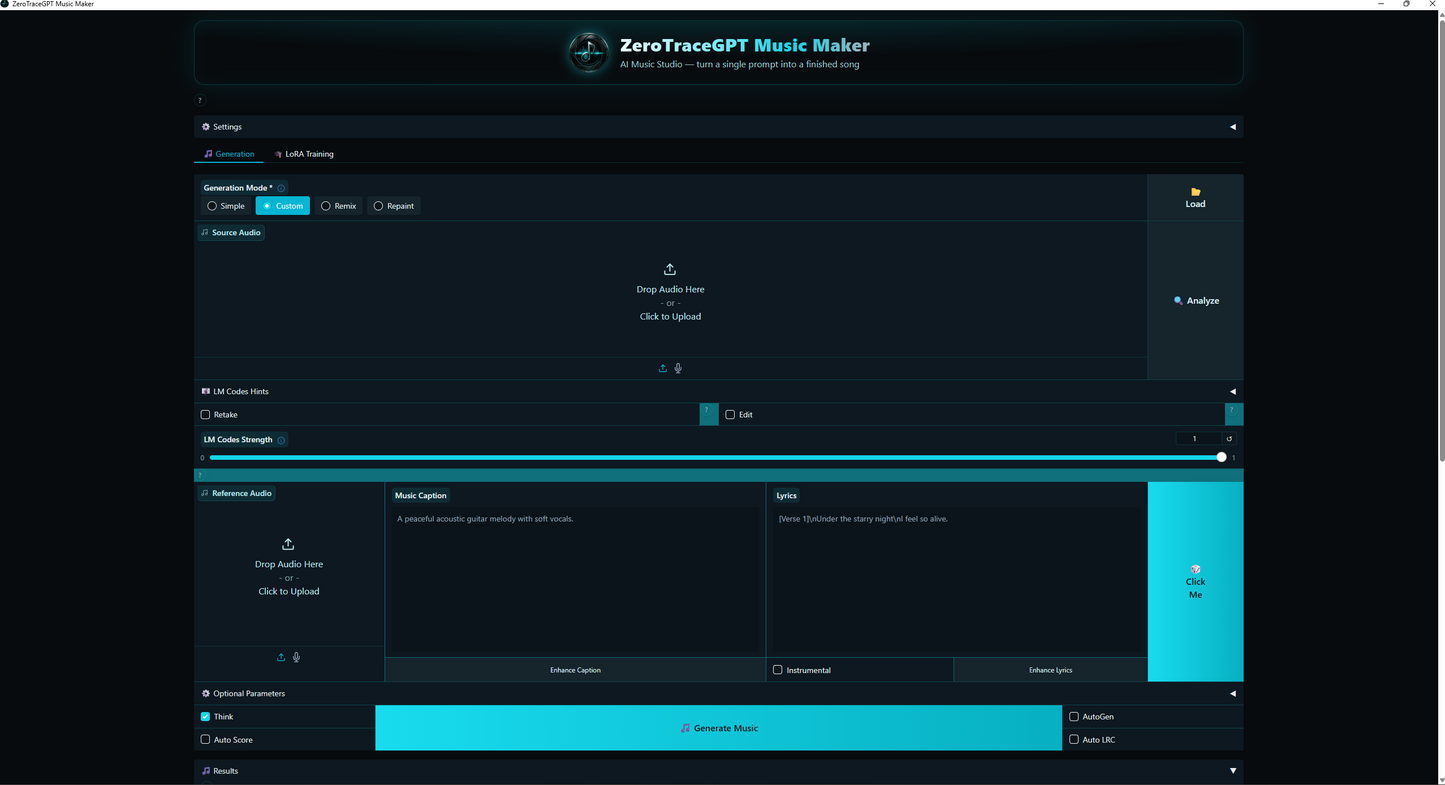
Add lyrics, choose the vocal language, and generate songs with vocals. Use structured lyrics like Verse and Chorus for better results.
Instrumental Music
Turn on Instrumental mode and create background tracks, intros, meditation music, cinematic scores, lo-fi beats, and more with no vocals.
Simple / Inspiration Mode
Start with a quick idea and let the app help shape the music direction.
Custom Mode
Write your own detailed Music Caption, lyrics, and settings for more control.
Remix Mode
Use an existing audio file as a starting point and create a new version with a different style or mood.
Repaint Mode
Fix or regenerate only a selected part of a track instead of changing the whole song.
Multiple Output Formats
Export your music in practical formats such as MP3, WAV, FLAC, Opus, and AAC.
Local File Control
Use Open Generations to instantly find, rename, organize, and back up your generated tracks.
Advanced Settings
Choose models, adjust output settings, manage performance, use Think mode, and explore deeper workflows when ready.
LoRA Training Tools
Advanced users can experiment with dataset building, preprocessing, and trained adapters for custom style workflows.
Built for Privacy
ZeroTraceGPT Music Maker is designed around private local AI music creation.
Your prompts, lyrics, and generated songs are processed on your own computer during normal local generation.
Internet is needed for first-time setup and model downloads, but after the required files are downloaded, you can generate with those downloaded models locally.
Simple version:
Download the models first. Create privately after.
No Monthly Music Subscription
ZeroTraceGPT Music Maker gives you a local AI music workflow without forcing you into a recurring cloud music subscription.
Buy it once, install it, download the required models, and create on your own PC.
Beginner-Friendly, Advanced When You Need It
Start simple:
- Open the app.
- Choose Simple or Custom Mode.
- Write what kind of music you want.
- Choose vocals or instrumental.
- Click Generate Music.
- Listen to the result.
- Save your favorite version.
- Open Generations to find your file.
Then go deeper when ready with Custom Mode, Remix, Repaint, model selection, output formats, and LoRA tools.
Included With Your Purchase
You receive:
- ZeroTraceGPT Music Maker Windows app
- Installer setup file
- Local AI music generation workflow
- Multiple generation modes
- Remix and Repaint tools
- Output/export options
- Advanced settings
- LoRA advanced tools
- Complete customer usage guide
- Prompt recipe library
- Troubleshooting and support guidance
Recommended Requirements
For the best experience, the requirements are:
- Windows 10 or Windows 11
- NVIDIA GPU
- 6GB+ VRAM
- 16GB+ RAM
- 25GB+ free disk space
- Internet connection for first setup/model download
CPU mode may work, but it is much slower. A supported NVIDIA GPU is strongly recommended for serious use.
For the Apple silicone version, the requirements are:
Apple Silicon
16GB of memory
Apple Silicon from 2019 or newer
Perfect For
ZeroTraceGPT Music Maker is ideal for:
- Content creators
- YouTubers
- Podcasters
- Video editors
- Small business owners
- AI creators
- Musicians experimenting with AI
- Game creators
- Social media creators
- Offline/private AI users
- Anyone who wants a local AI music studio without monthly cloud dependence
Share